mdfusion
A Python module for merging and exporting Markdown files. Available for pip.
When I am studying for exams, I often end up with a lot of Markdown files in a folder hierarchy. For revising the content, I want to merge these files into one single file and have them in a nicely readable format.
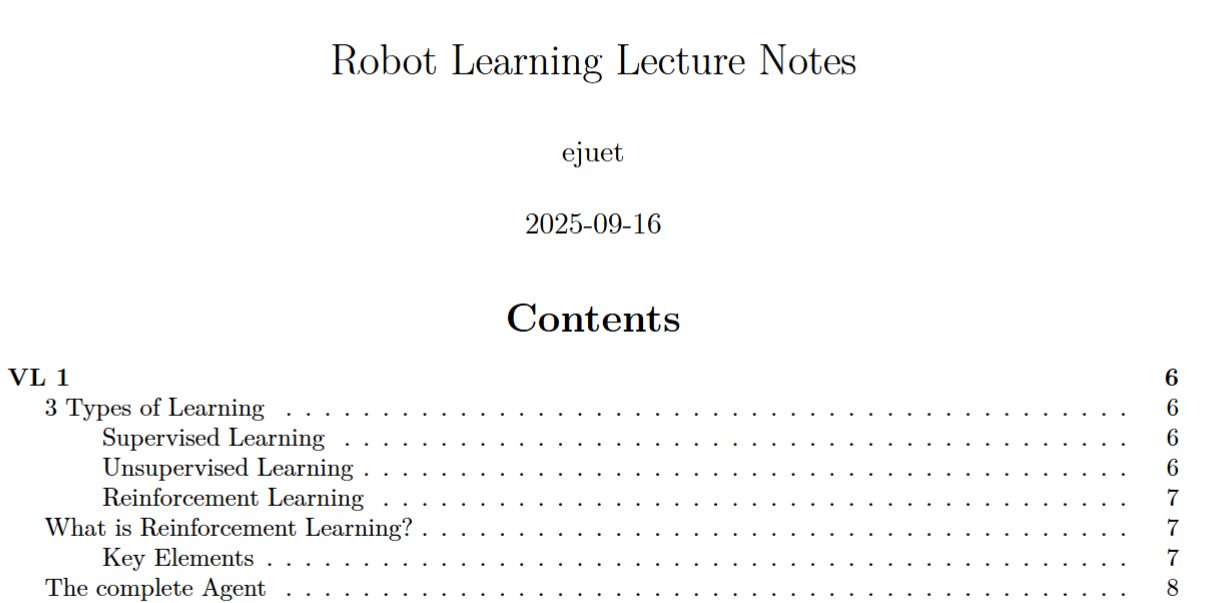
When looking for a solution, I did not find a tool that would crawl the directory for me, merge the files and export them to a PDF or HTML file in one go. So I wrote a small Python module using Pandoc that does exactly that. Since I feel like this is a common use case, I decided to publish it on GitHub and PyPI.
I also added a feature for exporting the merged Markdown to a Powerpoint-like presentation. To do this, I use Pandoc's native support for the reveal.js framework. The presentation can then be viewed in a web browser or exported to a PDF file, which I implemented via the python library Playwright. I figured this would come in handy if I ever need to prepare a presentation quickly.
The code is available on GitHuband on PyPI.
Project Setup
Even though this is a small project, I manage it in a git repository using
- pytest for unit tests
- pythons build module and twine for uploading the package to PyPI
- black for code formatting when a file is saved in VSCode
Documentation
mdfusion
Merge all Markdown files in a directory tree into a single PDF or HTML presentation with formatting via Pandoc + XeLaTeX.
Features
- Recursively collects and sorts all
.mdfiles under a directory (natural sort order) - Merges them into one document, rewriting image links to absolute paths (so images with the same name in different folders don't collide)
- Optionally adds a title page with configurable title, author, and date
- Can render the title page as its own centered page with a page break after it
- Supports both PDF (via Pandoc + XeLaTeX) and HTML presentations (via reveal.js)
- Customizes output with your own LaTeX or HTML headers/footers
- Configurable via TOML for repeatable builds (great for books, reports, or slides)
- Bundles HTML presentations with all assets for easy sharing
Installation
Requirements
For HTML presentations and PDF export from HTML, you may want to install:
- Playwright (for HTML→PDF conversion) via
pip install playwrightand thenplaywright install
pandoc is provided through the Python dependency pypandoc_binary, so you do not need a separate global Pandoc installation.
Install via pip
pip install mdfusion
Install from source
git clone https://github.com/ejuet/mdfusion.git
cd mdfusion
pip install .
Usage
mdfusion [OPTIONS]
You can also pass extra Pandoc arguments at the end of the command; any unknown flags are forwarded to Pandoc.
Common options
--root_dir DIRRoot directory for Markdown files (default: current directory, or config file directory)--output FILEOutput filename (default:<root_dir>.pdfor.htmlfor presentations)--tocInclude table of contents (use--notocto disable)--page_break_after_tocInsert a page break after the table of contents in PDF output (default: false)--title_pageInclude a title page (PDF only)--separate_title_pagePut the title page on its own centered page (default: true; use--noseparate_title_pageto disable)--title TITLESet title for title page (default: directory name)--subtitle TEXTSet an optional subtitle for the title page--title_page_image PATH_OR_URLAdd an optional local image or remote image URL to the title page--author AUTHORSet author for title page (default: OS user)--document_date TEXTSet the date text shown in metadata/title page (default: current date)--date_format FORMATstrftimeformat used when--document_dateis omitted (default:%d.%m.%Y)--pandoc_args ARGSExtra Pandoc arguments (whitespace-separated)--config_path FILEPath to amdfusion.tomlconfig file (default:mdfusion.tomlin the current directory)--header_tex PATHCustom LaTeX header to include (defaults to./header.texif present)--merged_md DIRWrite merged Markdown to this directory (uses a temp dir by default)--exclude PATHSWhitespace-separated files, directories, or glob patterns to skip while merging--remove_alt_texts TXTComma-separated list of image alt texts to strip (default:alt text)--verboseEnable verbose Pandoc output
Presentation options
--presentationOutput as a reveal.js HTML presentation (also converts to PDF)--generate_handoutAfter building a presentation, also build a non-presentation PDF handout (default: true; use--nogenerate_handoutto disable)--footer_text TEXTCustom footer for presentations--animate_all_linesAdd reveal.js fragment animation to each line--chromium_path PATHPath to Chromium for HTML→PDF conversion (default:/usr/bin/chromium)
Example: Merge docs/ into a PDF with a title page
mdfusion --root_dir docs --title_page --title "My Book" --author "Jane Doe"
Example: Create a reveal.js HTML presentation
mdfusion --root_dir slides --presentation --title "My Talk" --author "Speaker" --footer_text "My Conference 2025"
Configuration file
You can create a mdfusion.toml file in your project directory to avoid long command lines. The [mdfusion] section supports all the same options as the CLI. Presentation-only settings live under [presentation] (these can also remain under [mdfusion] for backward compatibility).
Example: Normal document (PDF)
[mdfusion]
root_dir = "docs"
output = "my-book.pdf"
toc = true
page_break_after_toc = false
title_page = true
separate_title_page = true
title = "My Book"
subtitle = "Working Draft"
title_page_image = "https://example.com/cover.png"
author = "Jane Doe"
date_format = "%d.%m.%Y"
pandoc_args = ["--number-sections", "--slide-level", "2", "--toc-depth", "4"]
exclude = ["drafts", "appendix/private.md", "notes/*.md"]
# header_tex = "header.tex"  # Optional: custom LaTeX header
Example: Presentation (HTML via reveal.js)
[mdfusion]
root_dir = "slides"
output = "my-presentation.html"
title = "My Talk"
author = "Speaker"
pandoc_args = ["--slide-level", "6", "--number-sections", "-V", "transition=fade", "-c", "custom.css"]
# You can add more reveal.js or pandoc options as needed with ["-V", "option=value"]

[presentation]
presentation = true
generate_handout = true
footer_text = "My Presentation 2025"
animate_all_lines = false
# chromium_path = "/usr/bin/chromium"
Then just run:
mdfusion
How it works
- Finds and sorts all Markdown files under the root directory (natural order)
- Merges them into one file, rewriting image links to absolute paths
- Optionally adds title/author/date metadata and a dedicated title page
- Calls Pandoc with XeLaTeX (for PDF) or reveal.js (for HTML presentations)
- Optionally bundles HTML output with all assets for easy sharing
Testing
Run all tests with:
pytest
Author
Comments
Feel free to leave your opinion or questions in the comment section below.